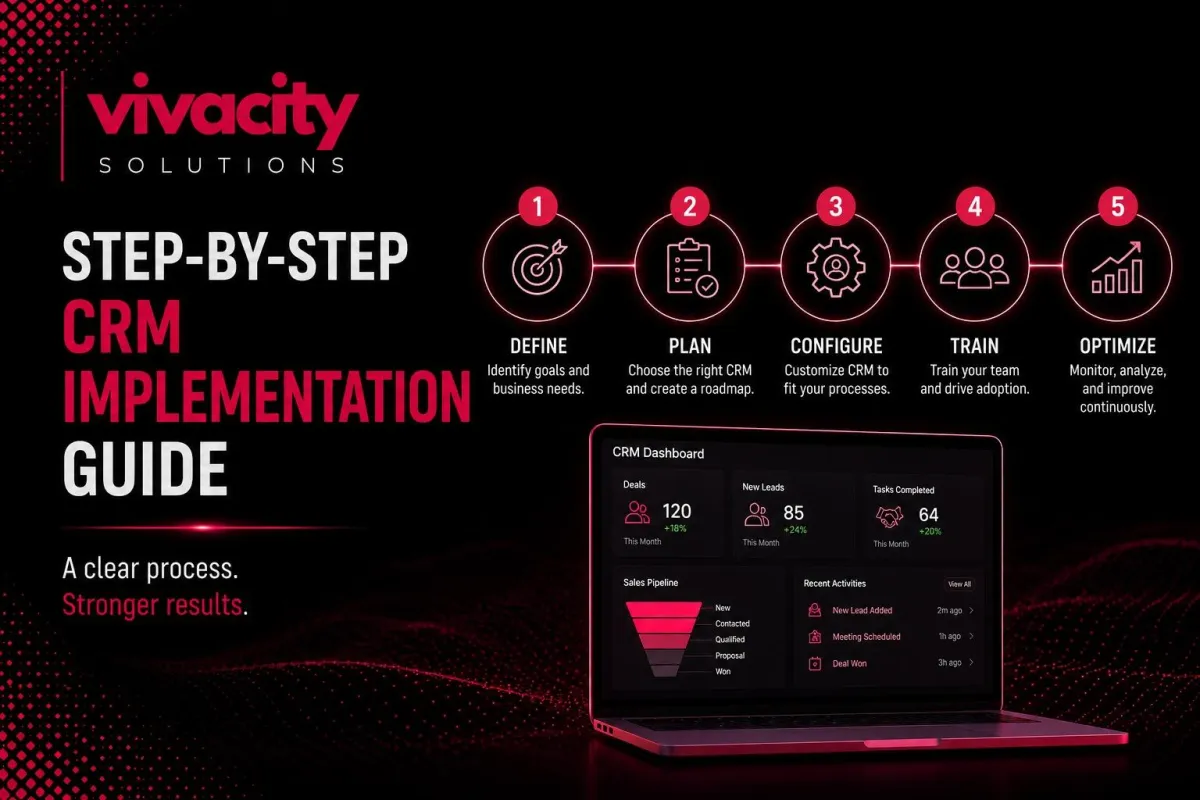
Step‑by‑Step CRM Implementation Guide | Process, Cost
Here is a conversation I have with business owners almost every week. "We bought a CRM six months ago. Our team hates it. Data is a mess. Nobody uses it. We wasted thousands of dollars. Now what?"
I hear this story so often that it has become predictable. The problem is rarely the CRM software itself. The problem is the CRM implementation process. Companies skip steps, rush the timeline, or ignore training. Then they wonder why their shiny new system collects dust.
A successful CRM implementation is not about installing software. It is about changing how your team works, how data flows, and how you manage customer relationships. When done right, your CRM system implementation transforms your business. When done wrong, it becomes an expensive ghost.
What is CRM implementation, and why does it matter?
Before we dive into the steps, let me answer this directly. CRM implementation is the process of planning, configuring, deploying, and adopting a customer relationship management system across your organization. It includes CRM data migration, CRM customization, CRM integration with other tools, user training, and ongoing CRM support.
A well‑executed CRM implementation process ensures your team actually uses the system, your data stays clean, and you see a return on your investment. A poor one leads to frustration, low adoption, and wasted budget.
This guide walks you through every step of the CRM implementation process, from planning to post‑launch support. You will learn CRM implementation steps, CRM implementation timeline, CRM implementation cost, and how to choose the right CRM implementation partner.
Written by Michael Vivacity, CRM Strategy Lead at Vivacity Solutions. I have led over one hundred CRM implementation projects for businesses of all sizes, from small agencies to global enterprises.
Why CRM Implementation Fails: Common Mistakes to Avoid
Before we get into the right way to do CRM implementation, let me quickly address why most implementations fail. Understanding these pitfalls is part of any good CRM implementation strategy.
The most common mistakes include skipping CRM data migration cleanup, trying to automate everything at once, ignoring user training, having no executive sponsorship, and failing to integrate with existing tools. These CRM implementation mistakes are avoidable if you follow a structured CRM implementation plan.
Many of these pitfalls are covered in detail in CRM integration mistakes, which focuses specifically on the technical side of connecting your CRM to other systems. For a complete picture, I recommend reading that resource alongside this guide.
The 10‑Step CRM Implementation Process
Let me walk you through the CRM implementation steps that have worked for hundreds of businesses. This CRM implementation roadmap applies whether you are a small business or a large enterprise.
Step 1: Define Your CRM Goals and Success Metrics
The first and most important CRM implementation step is getting clear on what you want to achieve. Do not skip this. Without clear goals, you cannot measure success, and you will not know what features to prioritize.
Common goals include: improve lead response time by fifty percent, increase sales team productivity by twenty percent, reduce customer churn by fifteen percent, or centralize customer data across five departments. Write down your goals. Make them specific and measurable.
Your goals will drive every other decision in your CRM implementation process: which CRM platform to choose, what data to migrate, how to configure workflows, and how to measure ROI. If you are unsure where to start, reading about CRM and CRM Features can help you understand what different systems can do for you.
Step 2: Assemble Your CRM Implementation Team
CRM implementation is not an IT project. It is a business project. Your team must include stakeholders from sales, marketing, customer service, and IT.
Assign a project leader who has the authority to make decisions. Include power users from each department who will champion the system internally. And ensure you have executive sponsorship. When leadership prioritizes the CRM system implementation, the rest of the team follows.
For complex implementations, you may need external expertise. This is where CRM implementation services or a CRM implementation partner can accelerate your timeline and prevent mistakes. Many companies also hire CRM consulting services to help with strategy and planning.
Step 3: Map Your Current Business Processes
Before you configure any software, map out how your teams work today. Where do leads come from? How are they assigned? What stages do deals go through? How do customer support tickets get handled? What reports do managers need?
Document these processes on paper. Then identify what is working and what is broken. Your CRM implementation is an opportunity to fix broken processes, not just digitize bad habits.
This step also helps you define your CRM sales pipeline stages, lead qualification criteria, and automation rules. If you need guidance on sales process design, read CRM best practices for sales teams and CRM and marketing automation for aligning sales and marketing.
Step 4: Choose the Right CRM Software or Platform
With your goals and processes clear, now you can select your CRM software. This is where many companies go wrong. They choose a platform based on features alone, without considering fit with their processes or team.
Evaluate options based on ease of use, CRM customization capabilities, CRM integration options, reporting, automation, mobile access, and CRM implementation cost. Popular platforms include HubSpot, Salesforce, Zoho, and custom solutions.
If off‑the‑shelf options do not fit your unique workflows, consider custom solutions. CRM Development Services and a CRM Development Partner can build a system tailored exactly to your needs. Also, understanding types of CRM systems and CRM vs ERP will help you decide whether you need a pure CRM or a broader business suite.
Step 5: Clean and Migrate Your Existing Customer Data
One of the most critical CRM implementation steps is CRM data migration. Do not import dirty data. Duplicate records, incomplete fields, and outdated information will ruin your new system.
Before migration, audit your existing data. Remove duplicates. Standardize naming conventions (for example, "ABC Corp" not "ABC Corporation"). Fill missing critical fields. Archive old or irrelevant records.
Then plan your CRM data migration strategy. Decide which fields map to which fields in the new system. Test the migration with a small sample before moving everything. And always keep a backup.
CRM data management is an ongoing discipline, not a one‑time event. After migration, schedule regular data audits. Clean data is the foundation of accurate CRM reporting and CRM forecasting. For more on data quality, read CRM data management best practices and CRM integration mistakes related to data sync.
Step 6: Configure and Customize Your CRM
Now you configure the CRM system to match your mapped processes. Set up CRM sales pipeline stages, custom fields, and validation rules. Define lead scoring and lead qualification criteria. Build CRM workflow automation for lead assignment, follow‑up reminders, and stage transitions.
CRM customization can range from simple field additions to complex custom objects and code. The goal is to make the system intuitive for your team. If a field is not needed, remove it. If a workflow is confusing, simplify it.
For advanced customizations, you may need CRM customization services or a CRM implementation partner. They can build custom modules, automate complex processes, and ensure your CRM platform scales with your business.
Step 7: Integrate Your CRM with Other Business Tools
A standalone CRM software is limited. The real power comes from CRM integration with your email, calendar, marketing automation, ERP, customer support, and billing systems.
Common CRM integrations include Gmail or Outlook for email sync, Zoom for meeting logging, Mailchimp or HubSpot for marketing, Slack for notifications, and QuickBooks or Xero for invoicing.
Plan your integrations carefully. Each integration adds complexity. Test each one individually. And ensure you have error handling in place. For deeper integration, you might explore Integrating CRM with Marketing Automation Tools, CRM-ERP Integration, and what is crm integration?
If you are using generative AI in CRM, integration with AI tools can also enhance lead scoring and content generation. Read How Generative AI Is Transforming Modern CRM Systems for more.
Step 8: Test the System with a Pilot Group
Before rolling out to your entire organization, test your CRM system implementation with a small pilot group. Choose a team of five to ten power users from different departments.
Have them use the CRM for two to four weeks. Give them real leads, real deals, and real support tickets. Collect their feedback. What is confusing? What is missing? What workflows are not working?
Fix issues based on pilot feedback. Then run a second pilot if needed. Testing catches problems before they affect your whole company. This is one of the most overlooked CRM implementation best practices.
Step 9: Train All Users and Drive CRM Adoption
The best CRM software is useless if your team does not use it. CRM training is not optional. It is essential.
Provide live, hands‑on training for every user role. Sales reps need different training than customer support agents. Managers need reporting training. Create quick‑reference guides and video tutorials.
CRM adoption requires ongoing reinforcement. Assign CRM champions in each department to answer questions. Run weekly office hours. Celebrate quick wins. And hold people accountable for using the system.
How to use CRM effectively should be part of your onboarding process for new hires. Without strong adoption, your CRM implementation will fail regardless of how well you configured the software. For service‑based businesses, read CRM for service-based industry‑specific adoption tips. For real estate, see How a CRM can change Your Real Estate Business.
Step 10: Launch, Monitor, and Provide Ongoing Support
After training, launch your CRM system company‑wide. But the work does not stop there. CRM implementation is not a one‑time project. It is an ongoing process.
Monitor CRM reporting and CRM analytics weekly. Are users logging activities? Are deals moving through the pipeline? Is forecast accuracy improving? Identify any drop‑off in adoption and address it quickly.
Provide ongoing CRM support through a help desk or dedicated administrator. Schedule quarterly reviews to optimize workflows, add new integrations, and refine automation. As your business grows, your CRM system must grow with you.
For ongoing success, many companies rely on CRM support services or a CRM implementation partner for managed services. They handle updates, training, and optimization so you can focus on selling.
CRM Implementation Timeline: How Long Does It Take?
The CRM implementation timeline varies by company size and complexity. Here is a realistic breakdown.
For a small business with out‑of‑the‑box CRM software, basic CRM setup and CRM configuration can take two to four weeks. This includes data migration, basic customization, and a day of training.
For a mid‑market company with moderate customization and several CRM integrations, plan on two to three months. This allows time for process mapping, data cleaning, custom fields, integration testing, and team training.
For an enterprise with custom development, complex CRM data migration, multiple integrations (ERP, marketing automation, support), and hundreds of users, the CRM system implementation can take six to twelve months.
When planning your CRM implementation timeline, add a buffer for unexpected issues. Data cleanup always takes longer than expected. User training always needs more sessions. Build in time for pilot feedback and adjustments.
If you work with an experienced CRM implementation partner, timelines can be shorter because they bring templates, tools, and expertise. CRM implementation services often include project management to keep you on track.
CRM Implementation Cost: How Much Should You Budget?
CRM implementation cost is one of the most common questions. Let me break it down.
For a DIY CRM setup of a simple, cloud‑based CRM, your cost is mostly your team's time plus the software subscription. Expect to invest twenty to forty hours of internal time.
For a professional CRM implementation with a partner, costs typically range from $5,000 to $20,000 for small to mid‑market projects. This includes project management, configuration, data migration, integration, and training.
For enterprise CRM implementation with custom development, deep integrations, and extensive customization, costs often start at $50,000 and can exceed $200,000. These projects involve dedicated project managers, developers, and data architects.
Ongoing CRM support and CRM optimization add annual costs, typically fifteen to twenty percent of the initial implementation cost. This covers software updates, user training, and minor enhancements.
When evaluating CRM implementation cost, consider the cost of not implementing properly. A failed implementation wastes your software investment and demoralizes your team. It is worth spending more up front to get it right.
For accurate budgeting, request quotes from CRM implementation companies or CRM implementation experts. Many offer free assessments. Also read CRM implementation cost estimation guides for your specific CRM platform, like Salesforce implementation or HubSpot CRM implementation.
Do You Need a CRM Implementation Partner?
For simple, out‑of‑the‑box CRM software, you may not need external help. Many small businesses successfully set up basic CRMs themselves.
However, for most mid‑sized and enterprise companies, a CRM implementation partner is highly recommended. Here is why.
A CRM implementation partner brings experience from dozens of similar projects. They know the common pitfalls and how to avoid them. They have templates for CRM data migration, CRM customization, and CRM integration. They accelerate your timeline and reduce risk.
A good CRM implementation partner also provides CRM consulting services to help you map processes, define goals, and measure success. They can act as a CRM implementation expert who guides your internal team.
When choosing a partner, look for relevant industry experience, client references, and clear pricing. Many partners offer CRM implementation services for specific platforms like Salesforce CRM implementation, Microsoft Dynamics 365 implementation, SugarCRM implementation, or SuiteCRM implementation.
For custom solutions, you might need CRM Development Services and a CRM Development Partner who can build from scratch. And for ongoing needs, CRM support services ensure your system continues to deliver value.
CRM Implementation for Different Business Types
CRM implementation looks different depending on your business. Here are a few scenarios.
CRM implementation for small businesses focuses on speed, simplicity, and low cost. Many small teams use off‑the‑shelf CRM software with minimal customization. The key is to avoid over‑engineering. Start with basic lead and deal management, then add features as you grow.
CRM implementation for enterprises is complex. It involves multiple departments, legacy data, and dozens of integrations. Enterprise CRM solutions require careful planning, executive sponsorship, and often a dedicated CRM implementation partner.
CRM implementation for sales teams emphasizes pipeline management, lead scoring, and forecasting. CRM for sales teams should be configured around your sales process. Read CRM best practices for more.
CRM implementation for marketing teams focuses on lead capture, segmentation, and nurturing. CRM and marketing automation integration is critical. See Integrating CRM with Marketing Automation Tools for details.
CRM implementation for customer service prioritizes ticket management, customer history, and SLA tracking. CRM customer service software integration ensures support agents have full context.
For industry‑specific needs, read CRM for service-based and How a CRM can change Your Real Estate Business.
Final Thought
CRM implementation is a journey, not a destination. The CRM implementation process I have outlined here works when you follow it step by step. Define your goals. Assemble your team. Map your processes. Clean your data. Configure your system. Integrate your tools. Test, train, launch, and support.
When you do CRM implementation right, your team will actually use the system. Your data will be accurate. Your sales pipeline will be visible. Your forecasts will be reliable. And your investment will pay for itself many times over.
Do not rush. Do not skip steps. And do not go it alone if you need help. The right CRM implementation partner or CRM consulting services can make the difference between a system that collects dust and a system that drives growth.
Start today. Pick one step from this guide and take action this week. Your future self will thank you.
For ongoing success, explore CRM Services that include implementation, training, and support. And always keep learning about CRM implementation best practices as your business evolves.
FAQs
What is CRM implementation?
CRM implementation is the process of planning, configuring, deploying, and adopting a customer relationship management system within an organization. It includes data migration, customization, integration, training, and ongoing support.
How long does CRM implementation take?
The CRM implementation timeline varies by complexity. A small business CRM setup can take 2‑4 weeks. Mid‑market implementations typically take 2‑3 months. Enterprise CRM implementations with custom development can take 6‑12 months.
How much does CRM implementation cost?
CRM implementation cost ranges from a few hundred dollars for DIY setup to $10,000‑$50,000 for mid‑market projects and $100,000+ for enterprise implementations. Costs include software licenses, customization, data migration, integration, training, and ongoing support.
Do I need a CRM implementation partner?
For simple, out‑of‑the‑box CRMs, you may not need a partner. For complex, customized, or enterprise‑grade systems, a CRM implementation partner brings expertise, accelerates timelines, and helps avoid costly mistakes.
What are the key CRM implementation steps?
Key CRM implementation steps include: define goals, assemble a team, map processes, choose a CRM, clean and migrate data, configure and customize, integrate with other tools, test, train users, launch, and provide ongoing support.
What is CRM data migration?
CRM data migration is the process of moving customer data from legacy systems (spreadsheets, old CRMs, email) into your new CRM software. It includes data cleansing, deduplication, field mapping, and validation.
How do I ensure CRM adoption?
Ensure CRM adoption by providing hands‑on training, appointing departmental champions, celebrating quick wins, integrating with daily workflows, and holding users accountable. Ongoing support and leadership sponsorship are also critical.
What is the difference between CRM implementation and CRM integration?
CRM implementation is the full process of setting up and deploying a CRM system. CRM integration specifically refers to connecting the CRM with other business tools like email, marketing automation, or ERP.
Can I implement a CRM without technical skills?
Yes, many cloud‑based CRMs offer no‑code setup wizards. However, for complex customizations or integrations, technical skills or a CRM implementation partner are recommended.
What is the best CRM for my business?
The best CRM depends on your business size, industry, budget, and required features. Popular options include HubSpot (small business), Salesforce (enterprise), Zoho (mid‑market), and custom solutions from Vivacity Solutions.
