What is CRM Integration? Everything You Need to Know
Let’s be real for a second. Your CRM platform is supposed to be the single source of truth for your customer relationships. But if your sales team is still manually copying data from your email into the CRM, and your support team can’t see what marketing just sent to a customer, you don’t have an integrated CRM. You have an expensive digital filing cabinet.
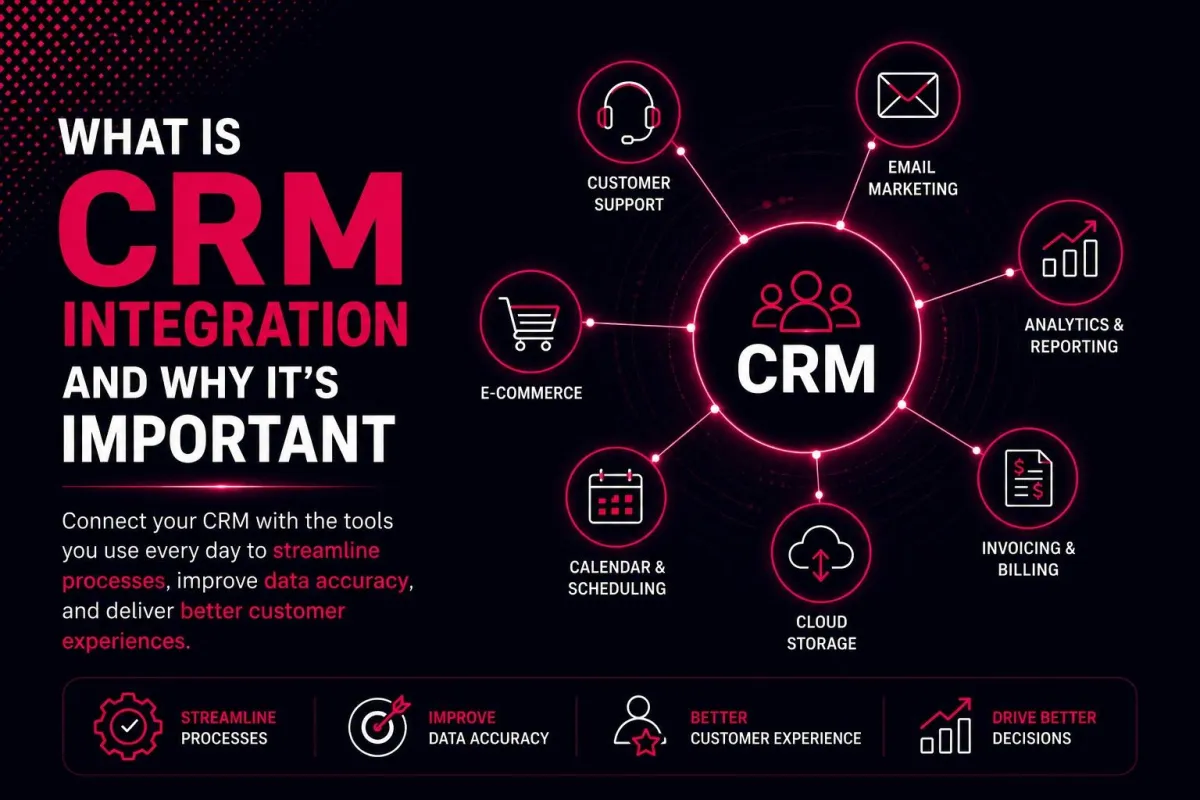
So, what is CRM integration? Simply put, it’s the technological bridge that connects your customer relationship management system with all your other business applications—email, billing, Slack, Shopify, you name it. When done right, you stop chasing data and start building real customer experience.
Why "What is CRM Integration?" Matters More in 2026
Most businesses don’t fail because of bad products. They fail because of data silos. Your marketing team lives in HubSpot, sales lives in Salesforce, and support is buried in Zendesk. None of them talks to each other.
What is CRM integration in this context? It’s the cure for that chaos. It means your CRM software integration automatically syncs every touchpoint. When a lead fills out a form, that info flows into the CRM without anyone lifting a finger. When a customer buys something, the support team sees it instantly. That’s customer relationship management integration at its finest.
Looking to build a seamless tech stack? Explore our CRM Development Services to create custom integrations tailored to your workflow.
How CRM Integration Actually Works
You don't need to be a developer to understand this. CRM integration platforms act like translators between different software. There are three main ways this happens:
1. Native integrations: These are pre-built connections inside your CRM platform. For example, HubSpot CRM integrations with Gmail take about two clicks. CRM integration with Outlook works the same way.
2. Third-party integrations, When your CRM doesn’t talk directly to a tool, you use middleware. Tools like Zapier or other iPaaS tools (Integration Platform as a Service) sit between your apps and move data around.
3. API-based CRM integrations. For custom needs, your developer builds an API integration. This is how CRM integration with Shopify or CRM integration with QuickBooks handles complex workflows like real-time inventory updates.
The result? Automated data synchronization that runs 24/7. No copy-paste. No forgotten updates. Just clean, real-time customer information flowing everywhere it needs to go.
Want to know which tools make this easy? Check out our guide on CRM automation tools to see the top platforms for 2026.
7 Real Benefits of CRM Integration
Let’s move beyond theory. Here’s what happens when you connect your integrated CRM platform to the rest of your business:
1. You Kill Data Silos for Good
When sales, marketing, and support share one unified ecosystem, nobody works off yesterday’s spreadsheet. Customer data management becomes automatic, not aspirational.
2. Your Sales Team Sells More
With CRM integration for lead tracking, reps see every email, call, and website visit before they pick up the phone. Sales and marketing alignment stops being a buzzword and starts closing deals.
3. Marketing Actually Knows What Worked
Customer behavior analytics improves dramatically when your marketing automation platform sees which leads turned into paying customers. You stop guessing and start optimizing.
4. Support Stops Asking "Can You Repeat That?"
CRM integration for customer service means that when a frustrated customer calls, the agent already sees their order history, support tickets, and recent emails. First-call resolution rates soar.
5. Your Stack Stops Growing Teeth
CRM integration tools for small businesses specifically help you avoid the "swivel-chair integration", the exhausting process of logging into five different systems just to update one customer record.
6. Reporting Actually Becomes Useful
CRM analytics gets smarter when it pulls from your e-commerce platform, email tool, and support desk. You get real business intelligence platform insights, not isolated numbers.
7. You Save Hours of Manual Work
Business process automation through CRM workflow automation tools eliminates thousands of tiny manual tasks. That’s the time your team spends on customers instead of data entry.
Curious how automation fits into this? Read our deep dive on CRM automation services to learn how to automate follow-ups, lead scoring, and more.
Best CRM Integration Platforms & Tools for 2026
Not all CRM integration platforms are created equal. Here’s what to look for based on your needs:
For small businesses, look for native integrations with the tools you already use. CRM integration with Gmail and CRM integration with Slack are non-negotiable for most lean teams. Pipedrive and HubSpot excel here.
For e-commerce, you need CRM integration for e-commerce specifically. CRM integration with Shopify is the classic example. When a customer abandons a cart, the CRM should trigger an automated email. ActiveCampaign and Klaviyo shine here.
For finance teams, CRM integration with QuickBooks or Xero is critical. You want revenue tracking that flows automatically from a signed deal to an invoice to payment. Salesforce and Zoho do this well.
For enterprises, look for API-based CRM integrations and best iPaaS tools for CRM integration, like Workato or Tray.io. These handle complex, multi-step workflow automation across dozens of systems.
AI-powered CRM integration platforms are also emerging in 2026. They don’t just move data; they predict what you need and automate customer support before a ticket is even opened.
Not sure which CRM fits your business? Start with our beginner’s guide: what is CRM? Then explore types of CRM systems to find your match.
How to Add CRM Integrations
Wondering how to add CRM integrations without breaking your existing setup? Here’s a simple roadmap:
Step 1: List every business application your team uses daily. Email, calendar, Slack, billing, help desk, ecommerce platform, marketing tools.
Step 2: Check your CRM platform’s app marketplace. Most modern CRMs list CRM integrations they support natively.
Step 3: For missing tools, consider iPaaS tools such as Zapier, Make, or n8n. These act as universal connectors.
Step 4: Start with one integration. Connect CRM integration with Gmail or Outlook first. That single step eliminates 80% of manual data entry for most sales reps.
Step 5: Test thoroughly before adding more. Check that automated data synchronization works both ways and that no data silos remain.
Step 6: Document your technology stack and who owns each integration. Trust me, future you will be grateful.
For a deeper comparison of CRM platforms, read CRM vs ERP to understand which system your business actually needs.
Common CRM Integration Mistakes to Avoid
Even smart teams mess this up. Here’s what not to do:
Integrating everything at once, you’ll create chaos. Start with one business application at a time.
Ignoring data hygiene, CRM integration amplifies bad data. Clean your records first.
Forgetting about security, API-based CRM integrations need proper authentication. Don’t skip this.
No owner for the integration. When something breaks, someone needs to fix it. Assign a human.
Buying tools that don’t talk. Before purchasing any software, ask: "Does this have native integrations with our CRM?"
The Future: AI-Powered CRM Integration Platforms
By late 2026, AI-powered CRM integration is shifting from "nice to have" to "must have." Instead of you manually building workflows, AI observes how your team works and suggests automated workflows. It identifies data silos you didn't even know existed and proposes CRM integration for marketing automation that adapts in real time.
The goal remains the same: a single source of truth for every customer interaction. The tools just get smarter about getting you there.
FAQs
What does CRM integration do?
CRM integration automatically syncs customer data between your CRM platform and other business applications like email, billing, support, and marketing tools. It eliminates manual data entry, breaks down data silos, and ensures every team sees the same real-time customer information.
What are the 4 pillars of CRM?
The four pillars are: Operational CRM (automating sales and marketing), Analytical CRM (analyzing customer data), Collaborative CRM (sharing data across departments), and Strategic CRM (using customer insights for business growth).
What are the 7 components of CRM?
The seven core components are: contact management, lead management, pipeline management, workflow automation, reporting and analytics, integration capabilities, and customer support features.
What are the 4 types of CRM?
The four main types are Operational CRM, Analytical CRM, Collaborative CRM, and Strategic CRM. Some sources also include Campaign Management CRM as a fifth type.
What are the 7 C's of CRM?
The 7 C's are: Customer, Connection, Conversation, Consistency, Customization, Context, and Collaboration. They represent the human and process elements of successful customer relationship management.
Is WhatsApp a CRM?
No, WhatsApp is a messaging app, not a CRM. However, many CRM integration platforms now offer WhatsApp integration, allowing you to log conversations and track customer interactions directly inside your CRM system.
What are the 5 principles of CRM?
The five guiding principles are: Customer focus (putting customer needs first), Data-driven decisions (using analytics not gut feeling), Cross-team collaboration (breaking down silos), Personalization (treating customers as individuals), and Continuous improvement (constantly optimizing processes).
Final Thought
So, what is CRM integration in plain English? It’s the difference between a CRM platform that stores data and an integrated CRM that powers your entire business. One is a tool. The other is a strategy.
Start small. Connect your email first. Then add one more. Before you know it, you’ll wonder how you ever survived the copy-paste era.
Ready to choose the right system? Compare features, pricing, and use cases in our guide to CRM Features before you buy.
