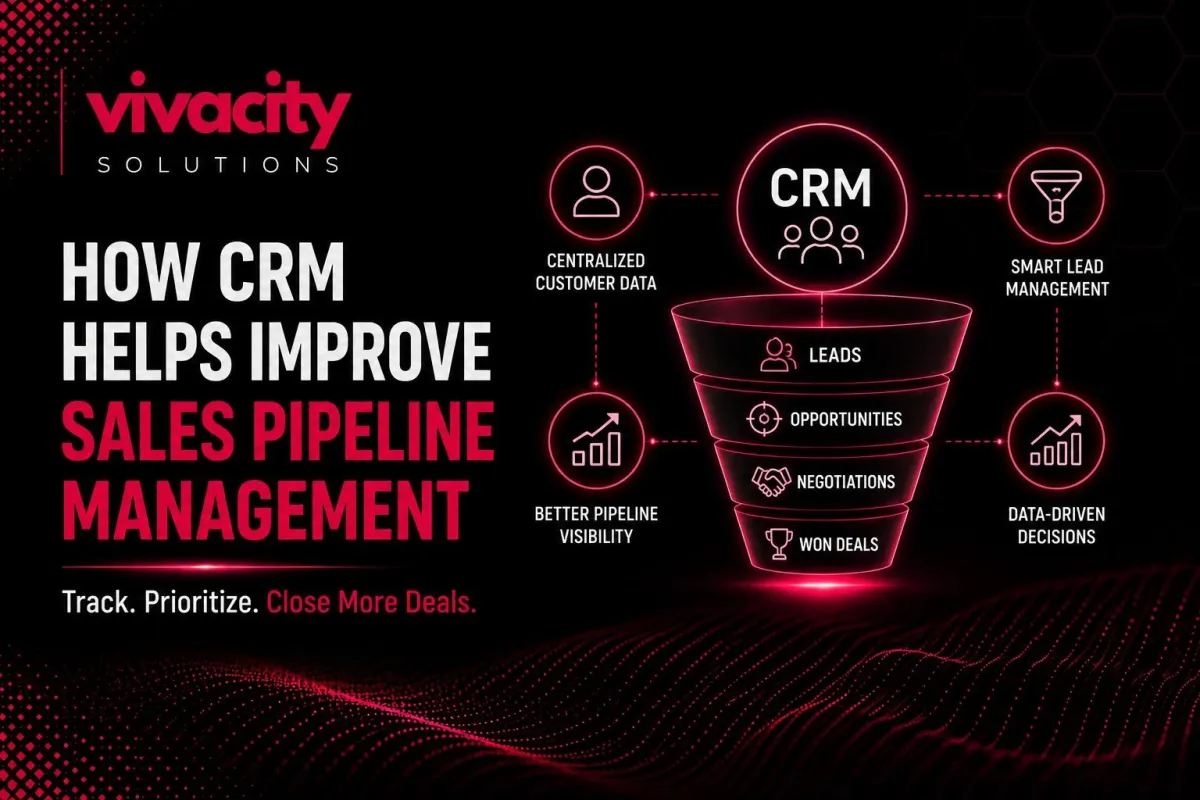
How a Sales CRM Helps You Master Pipeline Management?
Here is a question I hear from sales managers every single week.
"Why do we keep losing deals we thought were a sure thing? Our team works hard. They follow up. But somehow, opportunities go cold, forecasts are always wrong, and I have no real visibility into what is happening until it is too late."
The answer almost always lies in the pipeline. Not the physical pipeline of leads, but the way you track, manage, and analyze your sales opportunities. Without a structured system, your pipeline is just a messy collection of spreadsheets, sticky notes, and hopes.
This is exactly where sales CRM software for pipeline management changes everything. It transforms your chaotic sales process into a clear, visual, data‑driven engine that helps you close more deals, faster.
Written by David Chen, a sales operations specialist who has helped over 50 B2B companies implement CRM systems that doubled their pipeline visibility and forecast accuracy.
What Is Sales Pipeline Management and Why Does It Matter?
Sales pipeline management is the process of tracking every sales opportunity from the moment a lead enters your system until the deal is won or lost. It sounds simple, but in practice, most sales teams struggle with it.
Without proper pipeline management, you have no idea which deals are hot, which are stalled, or how much revenue you can realistically expect next quarter. Your team wastes time on leads that will never close while hot opportunities go cold.
Sales pipeline management matters because it directly impacts your bottom line. Companies with clearly defined and actively managed pipelines have win rates up to 28% higher than those without, according to industry studies.
A structured sales process helps you answer critical questions: How many opportunities are in each stage? What is our average deal size? How long does it take to close a deal? Which sales activities generate the most pipeline movement?
Without the right tools, answering these questions requires hours of manual spreadsheet work. With sales CRM software for pipeline management, the answers appear automatically on a dashboard.
If you are new to CRM fundamentals, start with our guide on what is CRM and types of CRM systems.
How Sales CRM Software for Pipeline Management Works
Sales CRM software for pipeline management is purpose‑built to handle the entire lifecycle of a sales opportunity. Unlike a simple contact manager or spreadsheet, it visualizes your sales pipeline in real time.
Here is how it works. Every lead or prospect is represented as a card or record. That card moves through customizable deal stages – for example, "New Lead," "Contacted," "Qualified," "Proposal Sent," "Negotiation," "Closed Won," "Closed Lost."
When you open a deal record, you see everything: the contact’s name and company, all past emails and calls, documents shared, next steps, and the expected close date.
The magic happens when you combine this visibility with CRM automation. The system can automatically create follow‑up tasks when a deal enters a new stage. It can send reminder emails. It can alert a manager if a deal has not moved in two weeks.
Pipeline analytics transform raw data into actionable insights. You can see your conversion rate from one stage to the next, average time spent in each stage, and the total value of your pipeline.
This is not just about tracking. It is about sales performance improvement. With clear data, you can coach your team on exactly where deals get stuck and what actions drive movement.
For more on automation, explore CRM automation tools and CRM and marketing automation.
Visualizing Your Sales Pipeline
One of the biggest advantages of sales CRM software for pipeline management is visual pipeline visualization. Most CRMs offer a kanban‑style board where you can see all your deals arranged by stage.
Think of it like moving sticky notes across a whiteboard, but digital, shareable, and always up to date. You can drag and drop a deal from "Proposal Sent" to "Negotiation" with one click.
This visual sales pipeline visualization gives you instant awareness. You can see which stages have too few deals (a warning for future revenue) and which stages have too many stalled opportunities (a sign that something is broken).
Pipeline visibility extends beyond individual reps. Managers can see the entire team's pipeline in one view. They can filter by rep, region, product line, or expected close date. This makes weekly pipeline reviews fast and fact‑based.
For B2B sales, where deals often involve multiple stakeholders and long cycles, visualization is critical. You can track not just the primary deal but also associated contacts, tasks, and documents.
Many sales CRM software for pipeline management platforms also offer pipeline heat maps. These highlight deals that have gone stagnant or are at risk of slipping. You can intervene before it is too late.
Automating Sales Workflows to Keep Deals Moving
Sales workflow automation is where sales CRM software for pipeline management saves your team hundreds of hours.
Consider a typical sales process. A lead fills out a "contact us" form. Without automation, someone has to create a deal manually, assign it to a rep, schedule a follow‑up, and send a welcome email. With automation, all of that happens instantly.
Here are common sales workflow automation rules you can set up:
When a new lead is captured, automatically create a deal in the "New Lead" stage and assign it to the next available rep based on territory or product interest.
When a deal moves to "Proposal Sent," automatically create a task for the rep to follow up in three days and send a reminder email to the prospect.
When a deal has not been updated in seven days, automatically flag it as "At Risk" and notify the sales manager.
When a deal is marked "Closed Won," it automatically triggers a post‑sale handoff to customer success and creates an invoice task for finance.
CRM automation for sales teams ensures that no deal falls through the cracks because someone forgot to make a call or send an email. The system remembers. The system prompts. The system escalates.
Sales workflow automation also standardizes your process. Every deal follows the same rules. This makes it easier to train new reps and maintain consistency as your team grows.
For advanced automation, read Integrating CRM with Marketing Automation Tools and CRM-ERP Integration.
Tracking Customer Interactions Without the Mess
A sales pipeline is not just about deals; it is about relationships. Every email, phone call, meeting, and proposal is part of the story. Without a central place to log these interactions, critical context gets lost.
Sales CRM software for pipeline management automatically logs emails (through Gmail or Outlook integrations). You can log calls manually or via integrated phone systems. Meeting notes can be added directly to the deal record.
This creates a complete customer interaction timeline. When a rep picks up a deal that someone else started, they see everything. No more "I did not know they already asked about pricing" or "Wait, they already received a proposal last month."
Customer profiles become richer over time. You see what content they engaged with, what objections they raised, and what competitors they mentioned. This intelligence helps you tailor your next conversation.
For opportunity tracking, every interaction is linked to the deal. You can see exactly which activities led to a deal moving forward – or which were ignored.
Team collaboration improves because everyone shares the same customer data. A sales rep can tag a manager in a comment on a deal record. A marketing person can see which leads became customers. A support agent can check the deal status before a renewal conversation.
For deeper team collaboration insights, read CRM for service-based businesses and How a CRM can change Your Real Estate Business.
Forecasting Revenue with Real‑Time Pipeline Analytics
Sales forecasting is one of the hardest parts of sales management. Traditional forecasting relies on rep‑entered probabilities, which are notoriously optimistic. A rep might say a deal is 90% likely to close, but historical data shows that deals at that stage close only 40% of the time.
Sales CRM software for pipeline management replaces guesswork with data. It tracks historical win rates by stage, rep, region, and product line. It then uses those rates to calculate a weighted forecast.
For example, if you have $100,000 in the "Proposal Sent" stage and your historical win rate for that stage is 50%, your weighted forecast is $50,000. If you have $50,000 in "Negotiation" with an 80% win rate, that adds $40,000. Total forecast: $90,000.
Revenue forecasting becomes more accurate over time as the CRM learns your business patterns. Some advanced CRMs even use machine learning to predict which deals are most likely to close based on hundreds of signals (email response rates, meeting attendance, stakeholder engagement).
Pipeline analytics also help you identify trends. Is your average deal size increasing or decreasing? Which lead sources produce the highest win rates? How does deal velocity change seasonally?
Sales forecasting tools within the CRM allow you to run "what if" scenarios. What if your team closes deals 10% faster? What if you increase the average deal size by $5,000? The CRM can model the impact on revenue.
For reporting and analytics best practices, read CRM integration mistakes.
Improving Sales Team Collaboration and Accountability
Sales collaboration is often overlooked, but it is critical for pipeline health. When reps work in silos, opportunities get mishandled. When managers have no visibility, problems fester.
Sales CRM software for pipeline management creates a shared source of truth. Every rep sees the same data. Every manager has the same reports. No more "I thought you were handling that account."
Team collaboration features include:
Activity feeds on each deal record – like a social media timeline for that opportunity.
Mentions and comments – tag a colleague with a question or request.
Shared task lists – assign follow‑ups to team members.
Deal ownership rules – clearly define who is responsible for each opportunity.
Accountability improves because everything is logged. Managers can see exactly which reps are updating their deals regularly, which are following up on time, and which are letting opportunities stall. This is not about micromanagement – it is about coaching based on facts.
Sales productivity rises when reps spend less time hunting for information and more time selling. With a centralized sales pipeline, a rep can, in two minutes, see their entire book of business: which deals need attention today, which are waiting on proposals, and which are at risk.
Sales performance becomes measurable at the individual and team level. You can track metrics like:
Number of deals created per week.
Conversion rate from lead to qualified.
Average time to close.
Win rate by rep.
Pipeline coverage (total pipeline value divided by quota).
These metrics help you identify top performers, replicate their behaviors, and provide targeted coaching to those who need help.
Common Pipeline Problems That a CRM Solves
Let me walk you through real pipeline problems and how sales CRM software for pipeline management solves each one.
Problem: Deals get stuck in stages without anyone noticing.
Solution: The CRM sends automatic alerts when a deal has not moved in a specified number of days. Managers can intervene before the deal goes cold.
Problem: Reps forget to follow up after demos or proposals.
Solution: Automation creates follow‑up tasks and reminder emails the moment a deal enters a new stage. No more "I forgot to call them back."
Problem: Forecasting is a guessing game.
Solution: Weighted forecasting based on historical win rates replaces optimistic guesswork. Your forecast becomes a reliable management tool.
Problem: Pipeline data is scattered across spreadsheets, email, and notebooks.
Solution: The CRM centralizes everything. Every interaction, every document, every note lives in one place.
Problem: New reps take months to learn the sales process.
Solution: The CRM enforces the defined sales process. Deal stages, required fields, and automation guide new reps step by step.
Problem: Managers have no visibility until the end of the quarter.
Solution: Real‑time dashboards show pipeline health at any moment. You know exactly where you stand every single day.
Problem: High‑value deals get neglected because reps focus on easy wins.
Solution: Pipeline analytics highlight the largest opportunities that need attention. You can prioritize based on potential revenue, not just activity.
For more on avoiding common pitfalls, read CRM integration mistakes and CRM Development Partner guides.
How to Choose the Right Sales CRM for Pipeline Management
Now, let me help you select the best sales CRM software for pipeline management for your team.
First, map your sales process on paper. How many stages? What are the entry and exit criteria for each stage? Do you need different pipelines for different products or sales motions? This clarity will guide your CRM selection.
Second, prioritize visual pipeline features. You need a CRM that offers a kanban‑style board, drag‑and‑drop deal movement, and customizable stages. Some CRMs are built specifically for pipeline management – Pipedrive is a prime example.
Third, evaluate automation capabilities. Can you set up rules to automatically trigger tasks, emails, and stage changes? Can you customize these rules without coding? The more automation, the less manual work for your team.
Fourth, check reporting and forecasting. Does the CRM offer weighted forecasting? Can you build custom pipeline analytics dashboards? Can you track conversion rates and velocity by rep, region, or product?
Fifth, consider integration with your existing tools. You likely use Gmail or Outlook, a calendar, and maybe a marketing automation platform. Ensure the CRM integrates smoothly.
Sixth, test with a pilot team. Sign up for a free trial. Have three to five reps use it for thirty days. Measure adoption and ask for feedback. A great CRM on paper is useless if your team hates using it.
For small to mid‑sized sales teams, excellent pipeline management software options include Pipedrive, HubSpot CRM, Zoho CRM, and Monday Sales CRM. For enterprise needs, Salesforce Sales Cloud and Microsoft Dynamics are strong.
Ready to choose? Explore CRM Development Services, CRM Features. Also read CRM vs ERP and How Generative AI Is Transforming Modern CRM Systems for advanced capabilities.
Final Thought
Mastering sales pipeline management is not about working harder. It is about working smarter with the right system. Sales CRM software for pipeline management gives you the visibility, automation, and analytics to turn your pipeline from a source of stress into a strategic asset.
When you can see every deal, automate every follow‑up, and forecast with confidence, your sales team transforms. They stop reacting and start executing. They stop guessing and start predicting. They stop missing quotas and start crushing them.
The best time to implement pipeline management software was last year. The second-best time is today. Your competitors are already using it. Do not let them win the race while you are still using spreadsheets.
Ready to master your pipeline? Explore what is crm integration, CRM automation services, and integrating CRM with Marketing Automation Tools to build a complete sales tech stack.
FAQs
What is sales CRM software for pipeline management?
Sales CRM software for pipeline management is a tool that helps sales teams track every deal from first contact to closing. It visualizes sales stages, automates follow-ups, and provides real-time analytics to improve forecasting and win rates.
How does a CRM help with sales pipeline management?
A CRM centralizes all leads and opportunities, visualizes deal stages, automates task creation, tracks customer interactions, and provides pipeline analytics. This helps sales reps prioritize activities and managers forecast accurately.
What are the benefits of CRM for sales teams?
Benefits include improved pipeline visibility, automated follow-up reminders, better lead management, accurate sales forecasting, increased team collaboration, and higher conversion rates across the sales process.
Can a CRM automate sales pipeline tasks?
Yes. CRM automation features include automatic task creation when a deal moves to a new stage, scheduled follow-up emails, lead assignment rules, and alerts for stalled opportunities.
What is the best CRM for pipeline management?
The best depends on your team size and needs. Popular options include Pipedrive (pipeline-focused), HubSpot CRM (free with strong visuals), Salesforce (enterprise), and Zoho CRM (affordable). Look for visual deal boards, automation, and reporting.
What is pipeline analytics?
Pipeline analytics is the analysis of your sales pipeline data to identify conversion rates, deal velocity, win rates by rep or stage, and revenue forecasts. CRM software provides these insights automatically.
How does CRM improve sales forecasting?
CRM improves forecasting by using historical win rates for each deal stage to calculate a weighted forecast, replacing rep‑entered optimistic probabilities with data‑driven predictions.
What is deal stage automation?
Deal stage automation refers to CRM rules that automatically create tasks, send emails, or update fields when a deal moves to a specific stage. For example, moving a deal to "Proposal Sent" could trigger a follow‑up task three days later.
Can a small sales team benefit from pipeline management CRM?
Absolutely. Even a team of two or three reps benefits from visibility, automation, and reporting. Many CRMs offer affordable plans for small teams, including free tiers.
How long does it take to implement a sales CRM for pipeline management?
For a small to mid‑sized team using a cloud‑based CRM, implementation takes one to four weeks. This includes setup, data import, customization, and basic training.
Ready to streamline your sales pipeline and boost productivity? Let Vivacity Solutions build the perfect CRM for your business. Contact us today.
